mOT
An opinionated terminal for macOS.
Instant ⌥ Space overlay · native APIs · 458 KB binary
An opinionated terminal for macOS.
Instant ⌥ Space overlay · native APIs · 458 KB binary
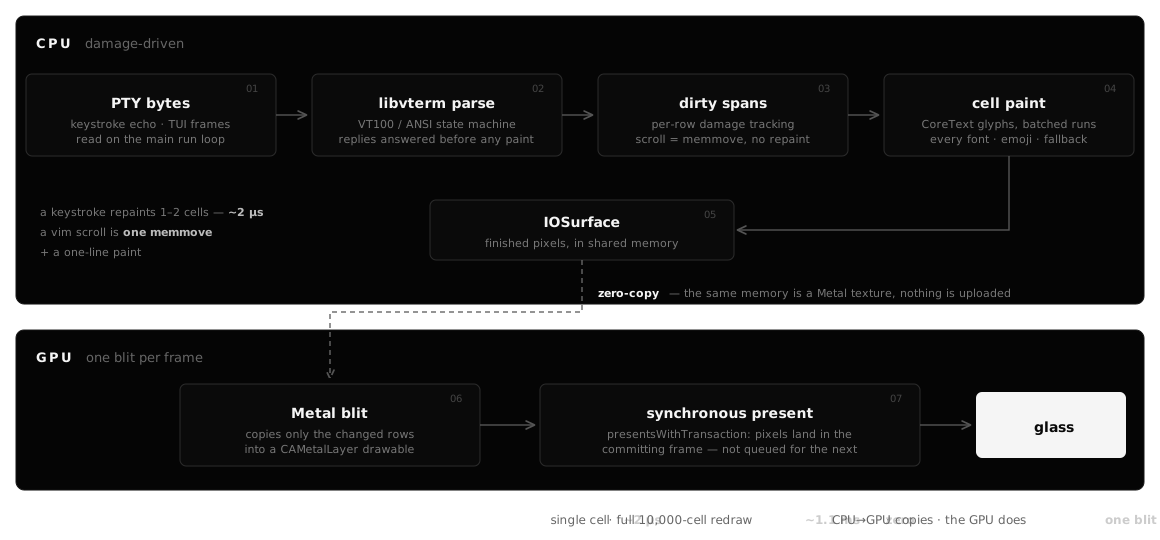
Draws every cell, cursor, and glyph on the CPU into a shared IOSurface.
Font loading, glyph shaping, and fallback fonts.
The CPU-rendered IOSurface is a zero-copy texture, blitted into a CAMetalLayer and shown synchronously to shave a frame of input latency.
GPU-composites the ⌘ M mosaic — every tab scaled live into a grid.
Neovim's VT100 / ANSI parser.
Runs PTY reads and writes off the main thread.
Registers the system-wide ⌥ Space hotkey.
Verifies the Pro license locally with RSA. No phone home.
Code-signed, EdDSA-verified auto-updates.
Windows, tabs, events, and the app shell.
Config lives in ~/.mot.yaml, hot-reloaded on save.
Editing is a Pro feature.
font:
  name: Maple Mono
  size: 14

# Two palettes. mOT picks one to match the macOS system appearance and
# switches live when you toggle Light or Dark.
dark:
  background: #000000
  foreground: #AAAAAA
  black: #000000
  red: #AC2B23
  green: #289E46
  yellow: #CAA71A
  blue: #007AFF
  magenta: #803CA2
  cyan: #277396
  white: #CCCCCC
  bright_black: #5B5B5B
  bright_red: #CC352D
  bright_green: #29AD4E
  bright_yellow: #E0B91D
  bright_blue: #3395FF
  bright_magenta: #C77DEA
  bright_cyan: #407A95
  bright_white: #FFFFFF
  cursor: #AAAAAA
  cursor_text: #000000
  selection_background: #CFA518
  selection_foreground: #333333
  link: #4880D9
  find_match: #CFA518
  find_match_current: #FECB1F

light:
  background: #AAAAAA
  foreground: #333333
  black: #000000
  red: #AC2B23
  green: #289E46
  yellow: #AD8F16
  blue: #007AFF
  magenta: #803CA2
  cyan: #277396
  white: #CCCCCC
  bright_black: #5B5B5B
  bright_red: #CC352D
  bright_green: #29AD4E
  bright_yellow: #BC9C1C
  bright_blue: #3395FF
  bright_magenta: #A467C1
  bright_cyan: #407A95
  bright_white: #FFFFFF
  cursor: #333333
  cursor_text: #AAAAAA
  selection_background: #CFA518
  selection_foreground: #333333
  link: #3C6AB4
  find_match: #CFA518
  find_match_current: #FECB1F

general:
  shell: zsh
  editor: vi
  hotkey: opt+space
  opacity: 1.00
  # margin: inset from the screen edge (points, 0–100)
  margin: 8
  # scrollback: lines of history kept per tab (200-100000)
  scrollback: 10000
  # max_columns: hard cap on grid width / scrollback row stride (80-512).
  # Lower it to cut per-tab memory (scrollback × max_columns × 16 bytes),
  # but windows wider than this will be clamped (dead space on the right).
  max_columns: 512
  # tab_placement: one of tl, tc, tr, bl, bc, br, none
  tab_placement: none
  # option_as_alt: which Option key sends Meta (ESC-prefixed) to the shell
  # vs. composes characters via your keyboard layout. On layouts where ⌥
  # types { } [ ] | \ etc. (e.g. Norwegian), keep at least one ⌥ composing.
  #   left  -> only left ⌥ is Meta (default), right ⌥ composes (like AltGr)
  #   right -> only right ⌥ is Meta, left ⌥ composes
  #   true  -> both ⌥ keys are Meta (never compose)
  #   false -> neither is Meta (both compose)
  option_as_alt: left
  # present_mode: how each frame reaches the screen.
  #   hybrid    -> small updates present immediately (low keystroke latency,
  #                smooth held-key scrolling), bulk output coalesces (default)
  #   sync      -> always present immediately (lowest latency, off-vsync)
  #   coalesced -> always present at the display refresh (smoothest for
  #                continuous animation; can stutter held-key scrolling)
  #   deadline  -> one present per refresh, sampled just before scanout
  #                (coalesced's pacing without the fast-scroll beat)
  present_mode: hybrid
  # scroll: trackpad scrolling style.
  #   smooth -> follows the trackpad by pixels, settles on a row (default)
  #   step   -> whole rows per wheel tick
  scroll: smooth
  # clipboard_read: whether programs may READ the system clipboard via
  # OSC 52 (tmux/nvim "paste from terminal"). When on, anything on the
  # tty (including remote ssh hosts) can read whatever you last copied.
  # Copying TO the clipboard via OSC 52 always works.
  clipboard_read: true
  # ligatures: whether adjacent characters like -> or != render as a
  # single combined glyph in supported fonts (Maple Mono, JetBrains Mono, etc.)
  ligatures: true
An opinionated terminal for macOS.
Download for macOS ↑ back to top